
Home Assistant,
without the browser tab.
A translucent panel that sits on your wallpaper, wired to your HA server over its WebSocket API. Click a light to toggle it, hold it to dim. Cameras, thermostats, media and 24-hour sensor graphs are all right there. Windows, macOS and Linux.
The Windows installer and the Linux AppImage update themselves. No account, no telemetry. It talks to your Home Assistant server, and to GitHub for updates and language packs. Nothing else.
These two rows are real app settings. The rain falls behind the glass, same as it does on your desktop.
What's in it
One WebSocket connection to your HA server. A tile flips at the same moment the light does.
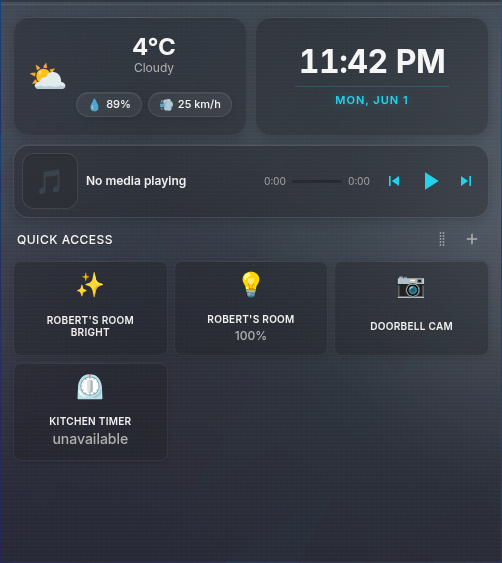
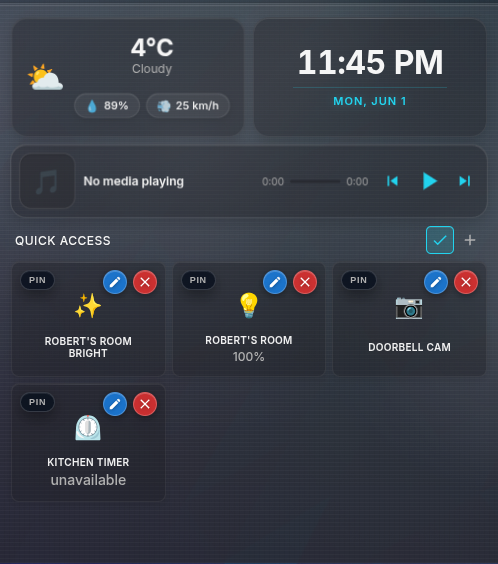
Drag the entities you actually use into a grid, split across named pages if one screen isn't enough. Click a tile to toggle it, hold it for the rest: brightness, fan speed, cover stop, target temperature. Custom names and icons live in the widget's config, never in yours.
Pull a supported tile out of the widget and drop it on the desktop as its own movable, resizable window. Pinned lights get 25/50/75/100 preset buttons, so a lamp can sit next to your clock and go to a quarter brightness in one click.
Up to seven sensors on one 24-hour chart, sharing a time axis and a value scale so the curves actually line up. Hover anywhere for a crosshair and every series' value at that moment. I mostly use it to put each room's temperature against the outdoor sensor and find out which radiator is slacking.
A camera tile can hold an authenticated HLS stream, or a snapshot every 30, 10 or 5 seconds if you'd rather not stream all day. Previews pause whenever the widget or the tile is hidden. Clicking a tile grows the feed you already have instead of reconnecting, and there's a Reconnect button for when the session goes stale anyway.
Bind a key to toggle an entity, run a script or fire an automation from inside any other app. A separate popup hotkey brings the widget to the front, hold-to-show or toggle. Once it's up, Ctrl+K searches every entity in HA and opens its controls.
You authorize it on Home Assistant's own login page in your real browser, over a temporary loopback callback. The refresh token goes into an OS-encrypted credential file, the short-lived access token stays in memory, and pairing fails closed if the OS keychain isn't available. Long-lived access tokens still work if you prefer them, filed under Advanced.
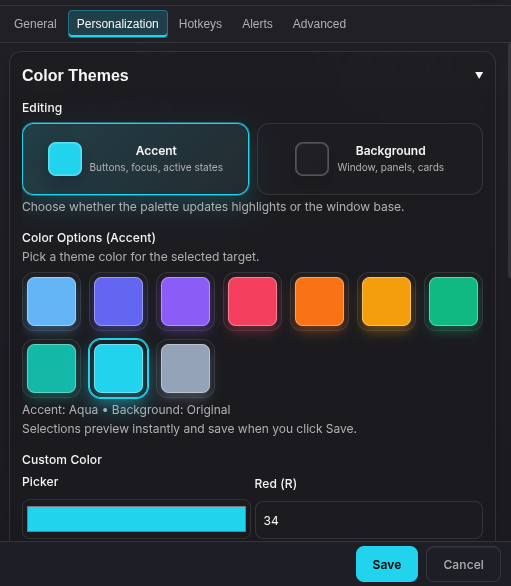
Accent and background colors, window opacity, frosted glass, and optional rain, snow, cloud, sun and storm animations behind the tiles. The weather effects are silly. It's your desktop.
Your layout, theme and tiles go into one JSON file in a folder you already sync. Drive, iCloud, Syncthing, whatever you've got. Newest write wins, the last five local profiles are backed up before a remote one lands, and you can encrypt the file with a passphrase (AES-256-GCM, scrypt). Tokens, window positions and hotkeys never leave the machine they're on.
The real thing
The widget above is a demo. These are screenshots of the app itself.
latest · all assets on the releases page
Windows
x64. The installer updates itself in-app; the portable build checks for updates and links you to the download.
macOS
Universal build for Intel and Apple Silicon. Not yet Developer-ID signed, so on first launch Control-click the app and choose Open, or approve it under System Settings, Privacy & Security.
Linux
x64. The AppImage updates itself in-app; the deb package updates through GitHub Releases.
There's a beta channel too. Turn on Receive beta updates in Settings and you'll get the nightly prereleases, which are cut automatically whenever main has moved.
MIT · no account · no telemetry · tray · start at login · OS-encrypted tokens · downloadable language packs
-
Install and open
Run the build for your OS and click the settings button.
-
Point it at Home Assistant
Enter the same URL you use in your browser, like
http://homeassistant.local. Click Connect and approve the widget on Home Assistant's own login page. Your password stays in the browser. -
Add your entities
Hit the "+" button, search for your lights, sensors and cameras, and drag them into whatever order makes sense. That's it.
There's also an optional companion integration that registers each desktop as a real Home Assistant device. Automations can then show it, hide it, switch its page, or push a whole named profile at it: theme, primary cards, tiles, graphs. It accepts those five actions and nothing else. No shell commands, no URLs, no arbitrary IPC.
HA Desktop Widget is an independent project and is not affiliated with or endorsed by Home Assistant or the Open Home Foundation.
Made by one person with more temperature sensors than rooms. If it earns a spot on your desktop, you can sponsor it on GitHub.